

LabX EU Withdrawal guide · Get started
LabX EU Withdrawal Button Form user guide
In short
LabX EU Withdrawal Button Form provides the technical electronic withdrawal function for Shopify stores under Directive (EU) 2023/2673 (Article 11a). Shoppers look up their order without logging in, select items, and submit a withdrawal declaration; the app sends an immediate confirmation email and tracks 14-day refund deadlines.
LabX EU Withdrawal Button Form provides the technical withdrawal function required for distance contracts under Directive (EU) 2023/2673 (amending Directive 2011/83/EU with Article 11a, applying from 19 June 2026). Shoppers can submit a withdrawal declaration without logging into an account, receive an immediate confirmation of receipt by email (durable medium), and your team can process every declaration from a single queue with 14-day refund deadlines and an append-only audit trail.
What you can do with the app
- Offer two storefront channels: Display a floating withdrawal button across your store, or link directly to your dedicated withdrawal page (
/apps/withdrawal) from your footer menu and legal pages. - No-login two-step flow: Customers look up their order using their full name, email address, and order number, select the items and quantities they are withdrawing from, and confirm their withdrawal declaration.
- Customize wording and appearance: Edit every heading, label, placeholder, and button text, choose between a step-by-step or continuous form layout, and match your brand colors and corner radii.
- Send durable-medium emails automatically: Send an immediate Confirmation of receipt email with a unique reference number (
#WD...) when a customer submits a declaration, plus admin notifications and approval or rejection emails. - Track 14-day refund deadlines and audit history: Filter requests by status (
Requested,Open,Declined,Canceled,Closed), monitor refund due dates, and rely on an append-only timeline that records every status transition and email sent.
Set up in four steps
- Install the app and turn on the withdrawal button and page.
- Customize the withdrawal form wording and lookup fields and style the form and floating button.
- Configure the 14-day withdrawal window, audience, and order tags.
- Review and process withdrawal requests and customize your email templates.
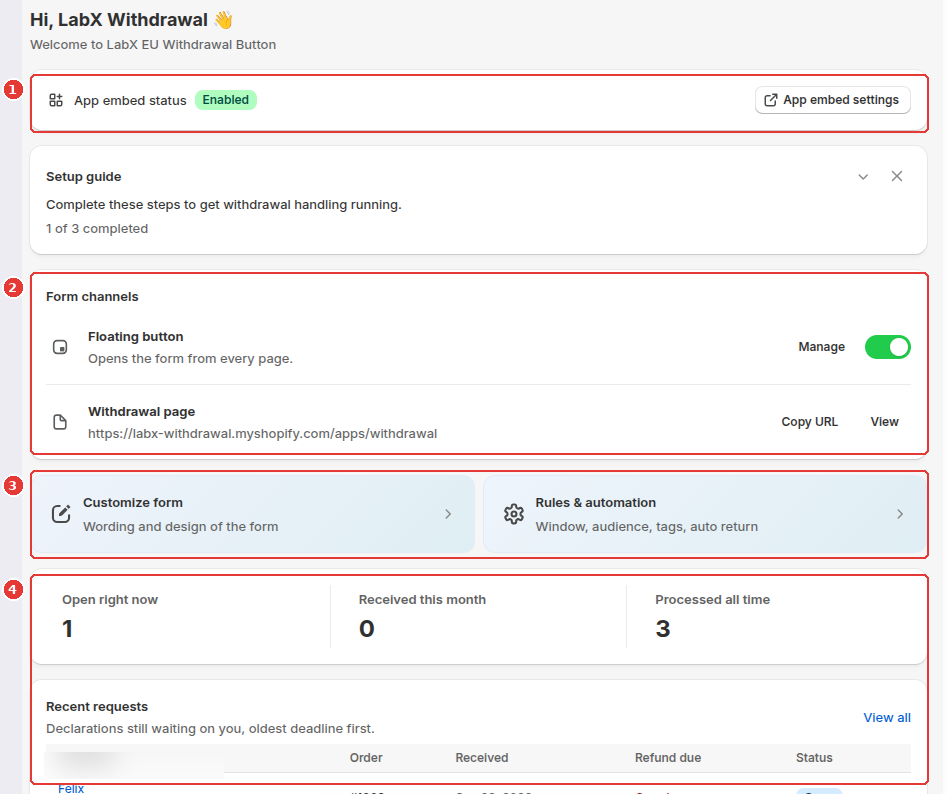
The app dashboard shows your App embed status (1), your active Form channels (Floating button toggle and /apps/withdrawal page URL) (2), quick links to Customize form and Rules & automation (3), and your live request metrics and Recent requests queue (4):
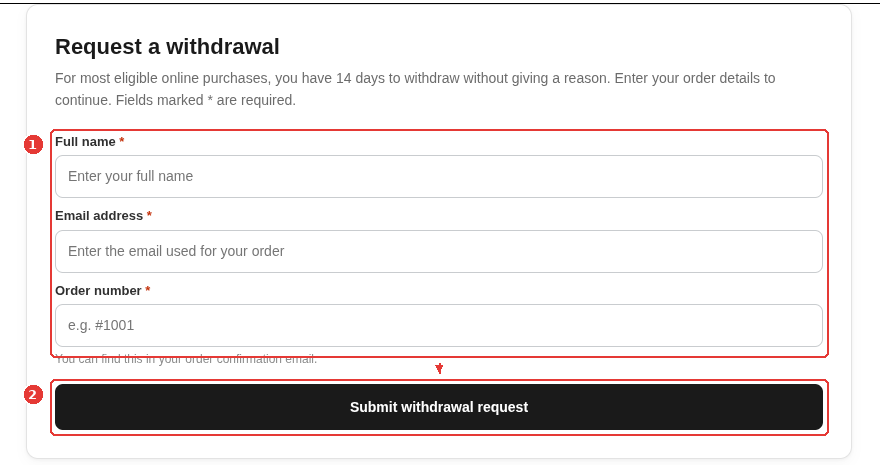
On your storefront, customers can open /apps/withdrawal (or click the floating button) to enter their order details (1) and submit their withdrawal request (2):
Still need help?
Our developers answer support directly. Email [email protected] or reach out through our contact page.