

LabX Fraud Filter guide · Get started
LabX Fraud Filter, Blocker user guide
In short
LabX Fraud Filter, Blocker helps you block or redirect unwanted storefront visitors by IP, country, region, ISP, user agent, or referrer, and enforce server-side checkout rules with a Shopify Function. Start by turning on the Fraud Guard app embed in your theme, then create your first blocking or checkout rule.
LabX Fraud Filter, Blocker combines two layers of protection for your Shopify store:
- Storefront Fraud Guard (theme app embed): Evaluates visitors in the browser against your IP, country, region, ISP, user-agent, and referrer rules, plus optional bot, Tor, and datacenter switches.
- Checkout Protection (Shopify Function): Evaluates checkout submissions on Shopify’s own servers before an order can be placed, so buyers cannot bypass checkout rules by disabling JavaScript or skipping the storefront.
What you can do with the app
- Block, redirect, or allow traffic: Match visitors by exact IP, IP prefix, IP range, CIDR block, country, region/state, ISP/ASN, user agent, or referrer URL, and choose whether to block them, redirect them to another URL, or whitelist them.
- Enforce server-side checkout validation: Block checkout attempts by email address, phone number, customer name, country, ZIP/postal code, or customer tag, with your own error message shown at the top of checkout or beside the matching field.
- Turn on automatic bot and network filters: Block unknown bots, suspicious headless browsers, Tor exit nodes, and datacenter IP ranges while keeping 25 search engine, social, AI, and SEO crawlers on an allowlist.
- Customize the block screen: Pick from six block page templates, edit the heading, message, colors, logo, or custom CSS, and use an admin bypass link so your own team is never locked out while testing.
- Review traffic and blocked events: Track allowed vs. blocked sessions over 7, 30, or 90 days in Analytics and inspect the 50 most recent blocked or redirected visits in the Visitor log.
Set up in four steps
- Install the app and turn on the Fraud Guard app embed.
- Create and manage blocking, redirect, and allow rules or set up IP and country rules.
- Add server-side Checkout Protection rules and configure bot and content protection.
- Customize the block page and copy your admin bypass link.
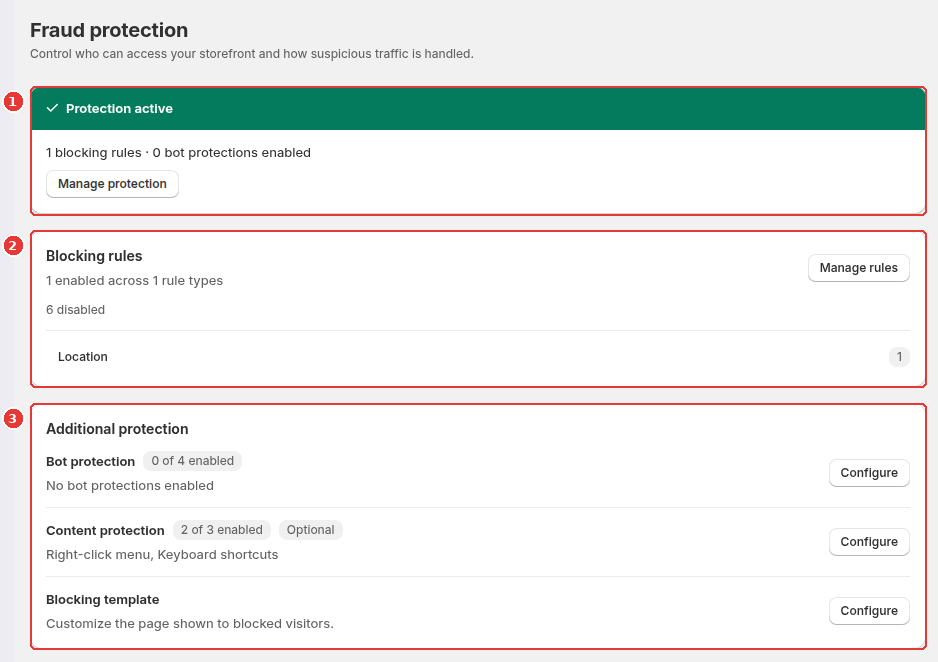
The app home page gives you an immediate overview of your protection status (1), a summary of your active blocking rules (2), and shortcuts to bot protection, content protection, and the blocking template (3).
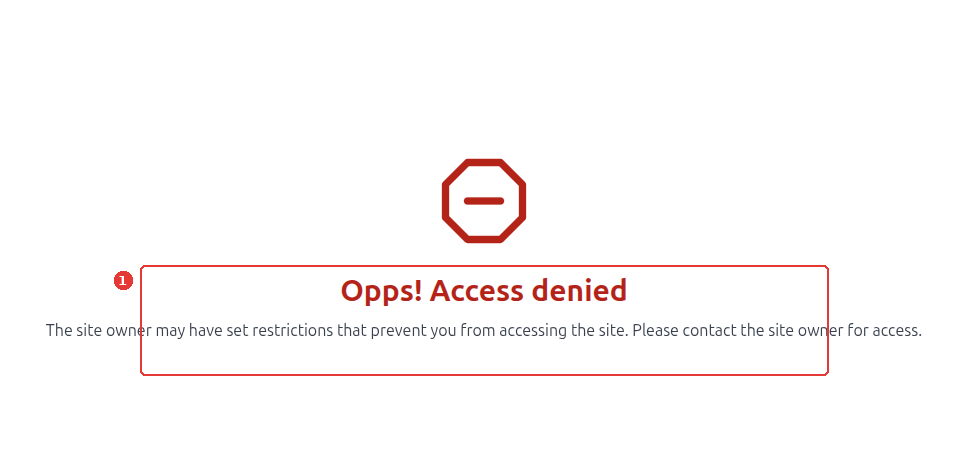
When a visitor matches an active storefront block rule, the Fraud Guard app embed replaces the storefront view with your configured block page (1):
Still need help?
Our developers answer support directly. Email [email protected] or reach out through our contact page.