

LabX EU Withdrawal guide · Widget & form
Customize withdrawal form wording and lookup fields
In short
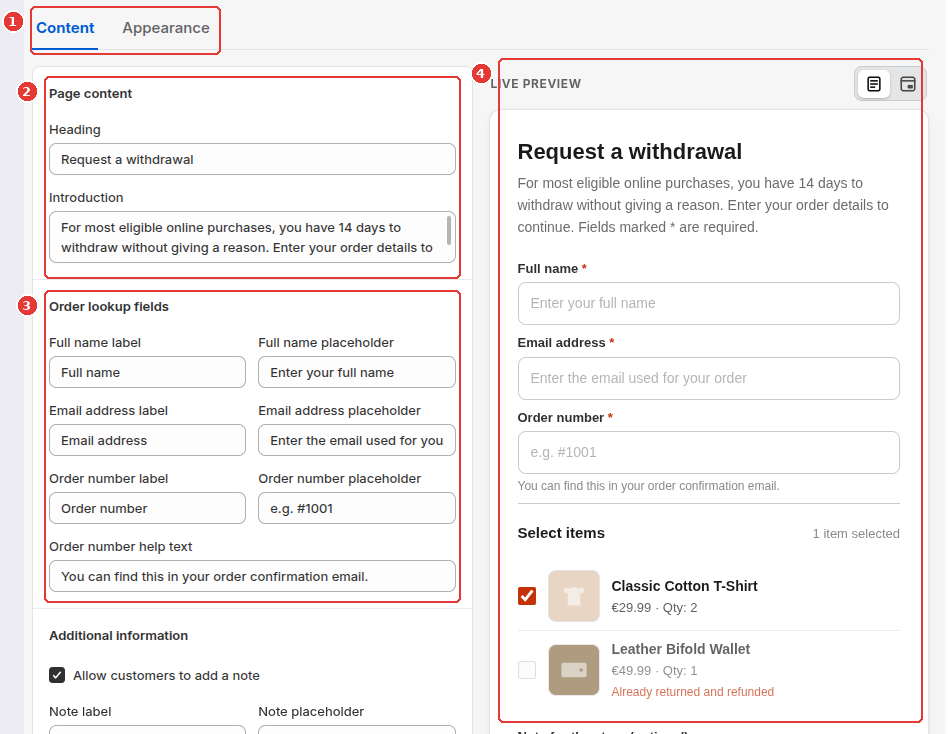
Open Widget & form > Content to customize every text string shoppers see on the withdrawal form, including the heading, 14-day cooling-off introduction, Full name, Email address, and Order number fields, optional customer note, and submit button labels, with a live interactive preview on the right.
In Widget & form, the Content tab lets you edit or translate every heading, field label, placeholder, and button label shown to shoppers.
Edit form headings, lookup fields, and notes
Open Widget & form from the app navigation:
- Select the Content tab at the top (1).
- Under Page content (2), edit the Heading (default:
Request a withdrawal) and Introduction text shown at the top of the withdrawal form. - Under Order lookup fields and Additional information (3):
- Customize the label and placeholder for Full name, Email address, and Order number, plus the Order number help text.
- Keep Allow customers to add a note checked if you want shoppers to have an optional Note for the store (optional) field.
- Scroll down to Button labels to customize the lookup, continue, and submit button text.
- Check the Live Preview on the right (4) to see how the form fields, line-item selection cards, and submit button render together, then click Save.
Storefront result in the floating modal
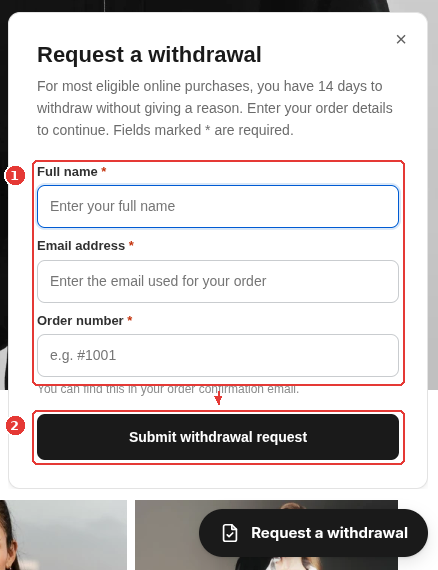
When a shopper clicks your floating Request a withdrawal button on the storefront, the modal displays your customized heading, introduction, and lookup fields (1) along with your submit button (2):
Frequently asked questions
Can I require customers to give a reason for withdrawing?
Under EU consumer law, consumers have the right to withdraw within 14 days without giving any reason. The optional customer note is never required, and the default placeholder reminds shoppers that they do not need to give a reason.
Why should I avoid wording that promises instant refund approval on submission?
Submitting the form records the customer's withdrawal declaration and triggers a confirmation of receipt. Your team still reviews the request and processes the refund within the statutory window, so keep your confirmation wording focused on acknowledging receipt of the declaration.
Still need help?
Our developers answer support directly. Email [email protected] or reach out through our contact page.