

LabX Fraud Filter guide · Settings & logs
Customize the block page and use the admin bypass link
In short
Use the Admin access link in Settings > General settings to bypass all storefront blocking rules in your own browser while testing. In Settings > Blocking template, click Edit template to choose from six presets and customize the heading, message, colors, logo URL, and custom CSS.
Before you test country or IP blocking rules that might match your own connection, grab your Admin access link so your browser is never locked out.
Step 1: Copy or rotate your Admin access link
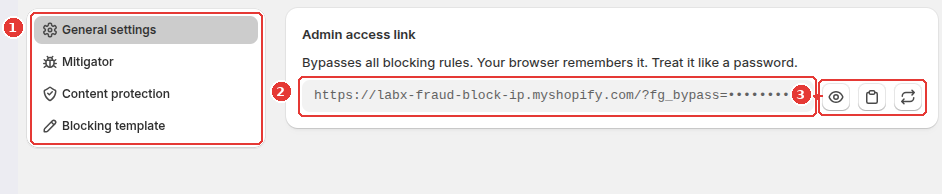
- Open Settings and select General settings in the left menu (1).
- Locate the Admin access link (
https://your-store.myshopify.com/?fg_bypass=...) (2). Visiting this link once in your browser stores a bypass token so all storefront blocking rules are skipped for you. - Use the action buttons next to the field (3) to Reveal the token, Copy link, or Generate new link if you ever need to rotate the token.
Step 2: Open the Blocking template settings
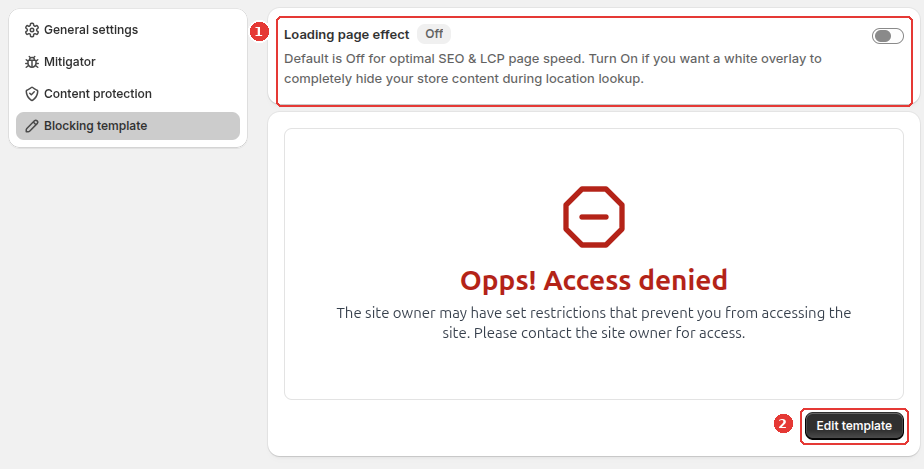
Click Blocking template in the left Settings menu:
- Decide whether Loading page effect should be Off (recommended for optimal SEO and LCP page speed) or On (shows a white overlay while location lookup completes) (1).
- Review the current block screen summary and click Edit template (2).
Step 3: Customize the block page in the editor
Inside the block page editor:
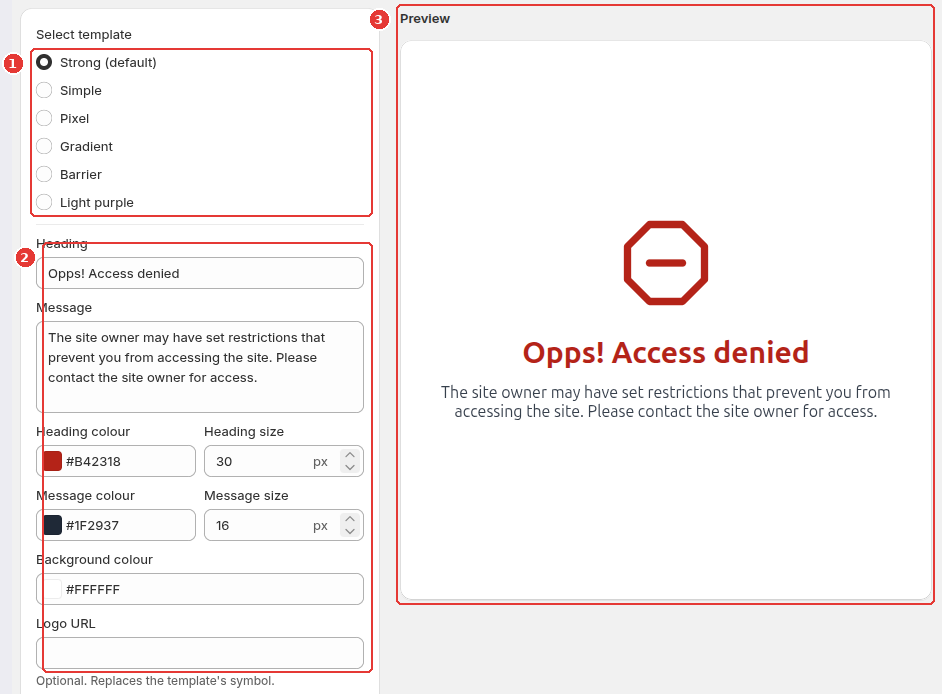
- Pick one of the six layout presets under Select template (1): Strong (default), Simple, Pixel, Gradient, Barrier, or Light purple.
- Customize the Heading, Message, Heading colour, Heading size, Message colour, Message size, Background colour, optional Logo URL, and optional Custom CSS (up to 4,000 characters) (2).
- Check the live Preview on the right (3) and click Save.
Frequently asked questions
What if I accidentally share my admin bypass link?
Click the Generate new link button in Settings > General settings. That immediately invalidates the old bypass token and issues a new URL.
Should I turn on Loading page effect?
Keep Loading page effect Off by default for the best SEO and Largest Contentful Paint (LCP) speed. Only turn it On if you want a white overlay to hide page content during the brief GeoIP country lookup on a visitor's first page view.
Still need help?
Our developers answer support directly. Email [email protected] or reach out through our contact page.