

LabX Fraud Filter guide · Get started
Install the app and turn on the Fraud Guard app embed
In short
After installing LabX Fraud Filter, Blocker, open the Shopify theme editor under Online Store > Themes > Customize, click the App embeds icon, toggle on Fraud Guard, and click Save. Once enabled, storefront rules and bot mitigations evaluate visitors automatically.
Storefront blocking rules, bot mitigations, and content deterrents run through a Shopify theme app embed called Fraud Guard. Shopify keeps new app embeds turned off until you enable and save them in your theme editor.
Step 1: Turn on the Fraud Guard app embed
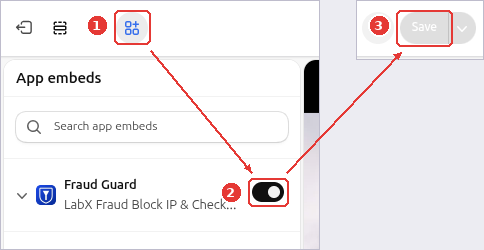
Open your theme editor from Online Store > Themes > Customize (or click the Enable app embed button in the app’s setup guide), then:
- Click the App embeds icon (1) in the far-left navigation rail.
- Toggle on Fraud Guard (
LabX Fraud Block IP & Checkout) (2). - Click Save (3) in the top-right corner of the theme editor.
Step 2: Check the protection status on the app home page
Return to LabX Fraud Block IP & Checkout in your Shopify admin:
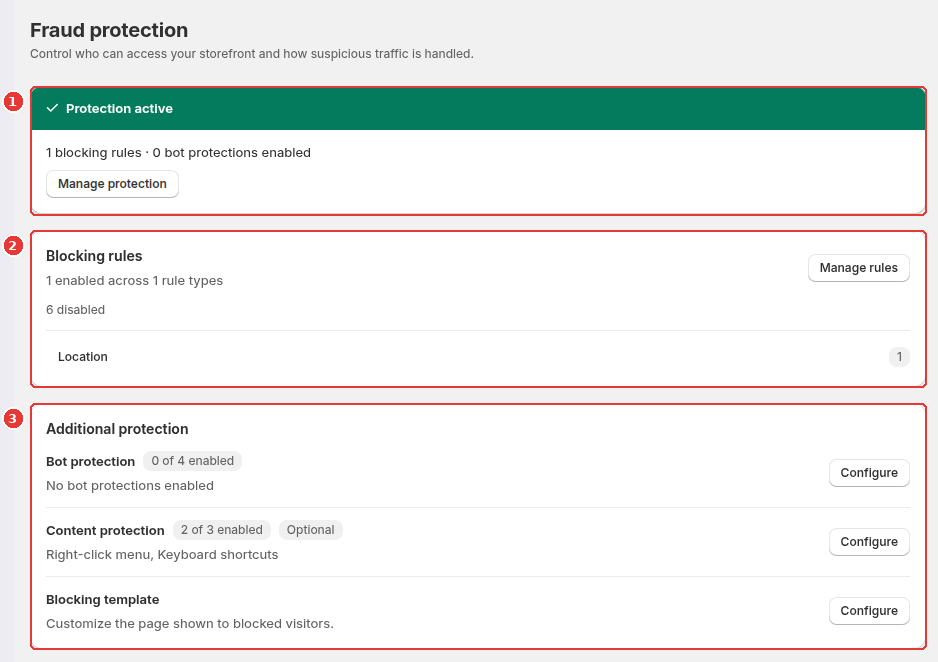
- Check the status banner at the top of the Fraud protection page (1). When the app embed is active and at least one rule or bot switch is enabled, it shows Protection active.
- Use the Blocking rules card (2) to see how many rules are enabled across each rule type and click Manage rules to add or edit rules.
- Review Additional protection (3) to configure Bot protection, Content protection, or your Blocking template.
Frequently asked questions
Does the Fraud Guard app embed slow down my storefront?
No extra request is needed for IP, user-agent, or referrer rules because they travel with the page in a Shopify metaobject. Country, region, and ISP rules trigger one GeoIP lookup per session, cached in the visitor's browser for 30 minutes.
What happens if the LabX lookup service is unreachable?
The storefront guard fails open. If a network error prevents the GeoIP lookup from completing, visitors are allowed through so an outage never locks real shoppers out of your store.
Still need help?
Our developers answer support directly. Email [email protected] or reach out through our contact page.