

LabX Fraud Filter guide · Settings & logs
Monitor blocked traffic in Analytics and the Visitor log
In short
Open Analytics to view Total allowed, Total blocked, and Block rate over the last 7, 30, or 90 days, along with top blocked countries and block reasons. Open Visitor in the app navigation to inspect the 50 most recent blocked or redirected visits by IP, country, device, and path.
Once the Fraud Guard app embed is active on your storefront, Analytics and the Visitor log show what traffic is being allowed, blocked, or redirected.
Review traffic trends in Analytics
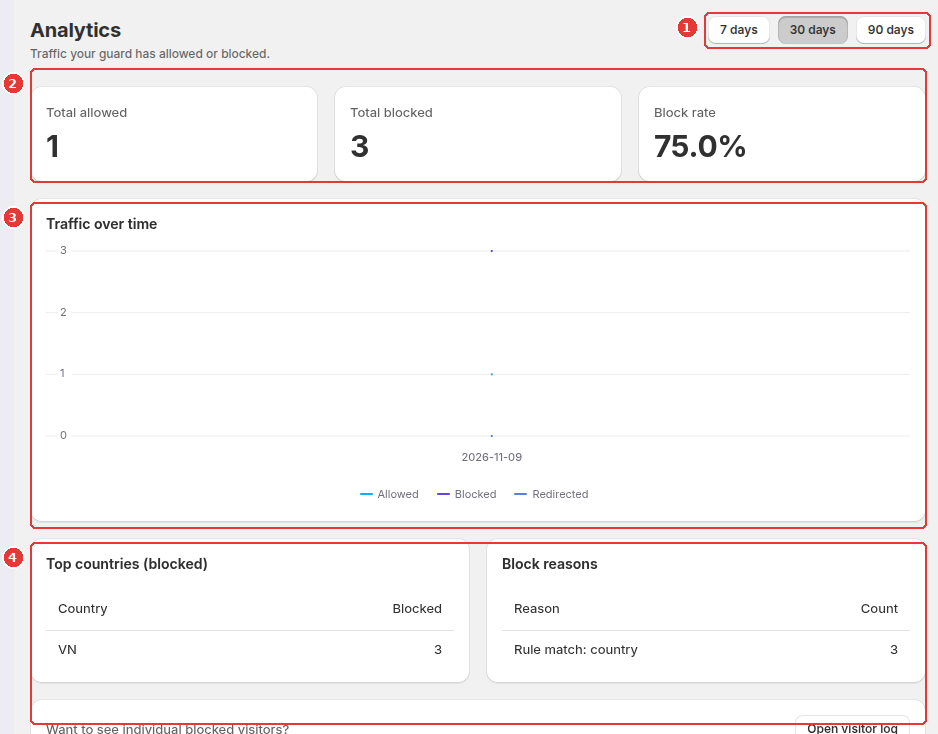
Open Analytics from the app navigation:
- Switch between 7 days, 30 days, and 90 days in the top-right corner (1).
- Check the three headline KPI cards (2): Total allowed, Total blocked, and Block rate.
- Use the Traffic over time chart (3) to compare daily
Allowed,Blocked, andRedirectedsessions. - Review Top countries (blocked) and Block reasons at the bottom (4) to see which countries and rule types trigger the most blocks, or click Open visitor log.
Inspect recent events in the Visitor log
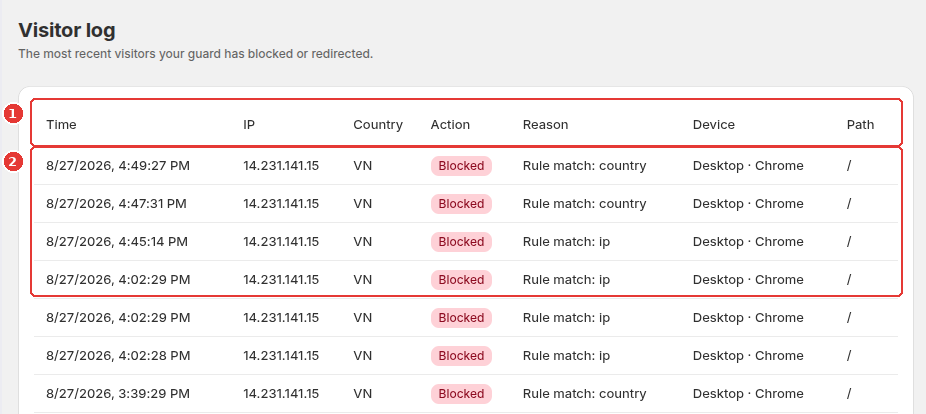
Open Visitor in the app navigation (or click Open visitor log from Analytics):
- Review the table headers (1): Time, IP, Country, Action, Reason, Device, and Path.
- Inspect each recent blocked or redirected visit (2) to see the visitor’s IP address, two-letter country code, the exact rule criteria that matched (for example
Rule match: countryorRule match: ip), their browser/OS, and the URL path they requested.
Frequently asked questions
How many entries are kept in the Visitor log?
The Visitor log displays the 50 most recent blocked or redirected storefront events, including timestamp, IP address, country code, action, matching rule reason, device/browser, and storefront path.
Does the Visitor log record every normal shopper?
To keep the log focused and fast, the Visitor log lists visitors who were blocked or redirected by your guard, while aggregate allowed vs. blocked counts are tracked in Analytics.
Still need help?
Our developers answer support directly. Email [email protected] or reach out through our contact page.